Free Template

Free Take 5 Safety Checklist Template (PDF)

A Take 5 is a quick safety check you do before starting a job: stop, think, identify the hazards, plan your controls, then proceed. Download the free checklist below, or read on for a filled-in example and how to complete one.

What a Take 5 is

  • A Take 5 is a short check of the hazards around you, done on the spot before you start a task or when conditions change.
  • It's quick to complete, and it sits alongside a SWMS or JSA rather than replacing one where one is needed.
  • Many sites and principal contractors ask workers to complete one before each task or each day. Check what yours requires.

Not sure whether your job needs a SWMS? Read what a SWMS is and when it's required.

What's on the Take 5 checklist

  • Job details: who prepared it, the date and time, the job location, a description of the job and the supervisor's name.
  • 14 hazard questions you answer Yes or No, covering slips and trips, falls, being struck by something, strain, electricity, nearby activities, weather, and whether you need a permit.
  • A controls table to record the hazard number, risk rating and the controls you put in place, and whether those controls will manage the hazard.

The 5 steps: stop, think, identify, plan, proceed

  • Stop: pause before you start and take a look at the job and the area around it.
  • Think: what are you about to do, and what could go wrong?
  • Identify: work through the hazard questions and mark any that apply.
  • Plan: write down the controls for each hazard and rate the risk.
  • Proceed: start only once the controls are in place, and redo the Take 5 if conditions change.

Filled-in Take 5 example

Example only, not for use as your own Take 5. This is the free template filled in for replacing ceiling light fittings in an office. Click the image to enlarge it.
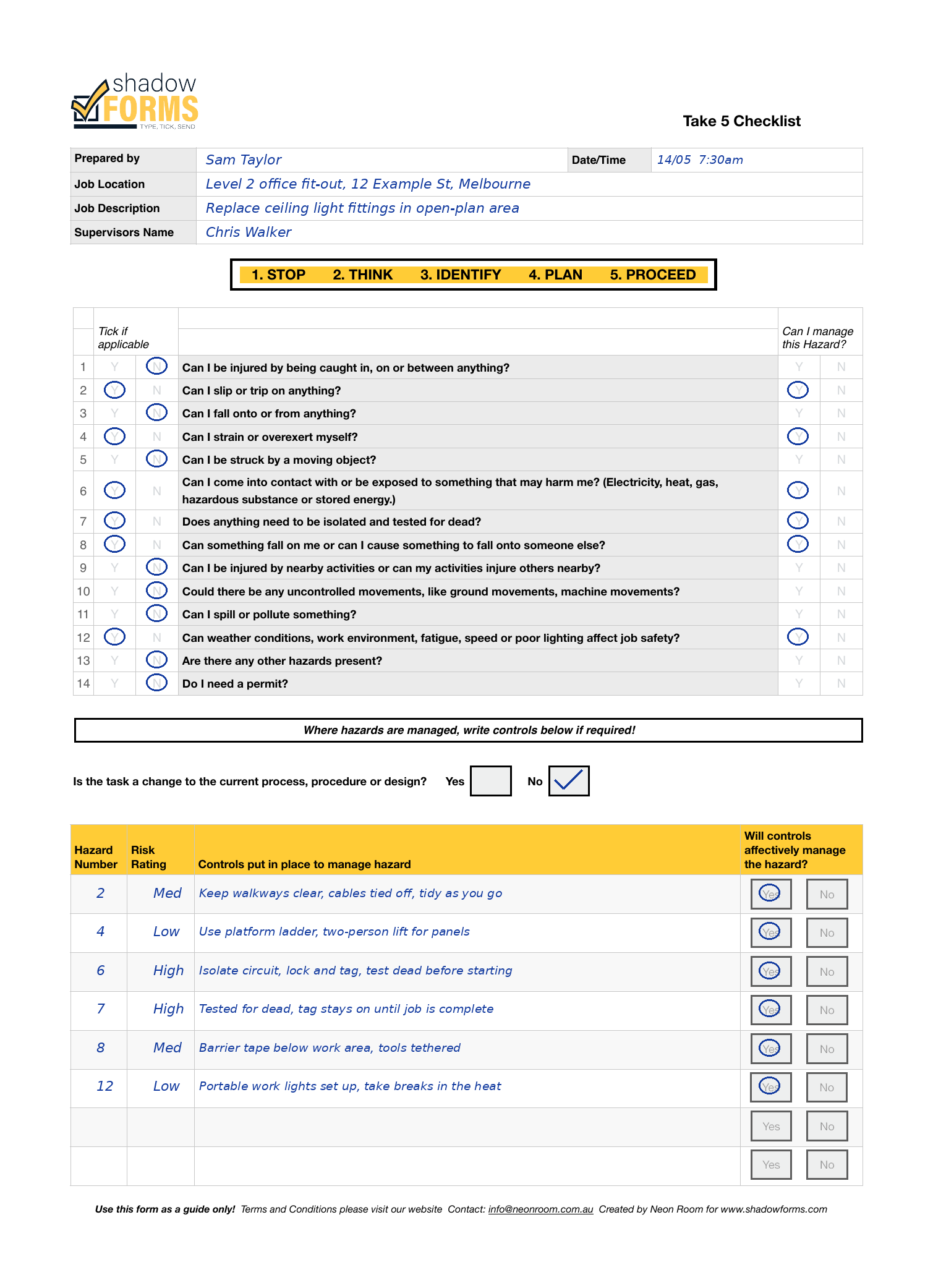
Your own Take 5 should reflect the actual job and site conditions, completed by the people doing the work.

How to fill one in

  1. Fill in your name, the date and time, the job location, a description of the job and your supervisor's name.
  2. Go through all 14 questions and mark Yes or No for each.
  3. For every Yes, mark whether you can manage that hazard.
  4. In the controls table, write the hazard number, the risk rating and the controls you'll put in place, then mark whether they will manage the hazard.
  5. If you can't manage a hazard, stop and speak to your supervisor before you start.

Take 5 on paper, or in the app

Prefer not to carry paper? With Shadow Forms your Take 5 lives in the app, so it's quick to complete on site, and every completed one lands on your dashboard instead of getting lost in the ute.

Forms also work offline, and any form can be duplicated as a starting point for the next job. See the app, or read about the AI-powered JSA for skilled trades.

Need a SWMS instead? Get the free SWMS template.

Running a crew meeting instead? Get the free toolbox talk template.

Frequently asked questions

Is a Take 5 a legal requirement?

Requirements vary by state, industry and site. Many employers and principal contractors ask for one, so check your state regulator and what your site requires.

What's the difference between a Take 5 and a JSA?

A Take 5 is a quick check you do just before starting, covering the hazards in front of you. A JSA breaks a job into stages and sets controls for each one, so it's usually more detailed.

Can I use a generic Take 5 template?

Yes, as a starting point. Fill it in for the actual job and site, and redo it if conditions change.

Do I need an app to do a Take 5?

No. The template works on paper. An app saves retyping and keeps every completed Take 5 in one place.

When should I do a Take 5?

Before you start a task, and again whenever something changes, such as the weather, the work area or who is working nearby. Check how often your site requires one.

General information only, not legal advice. Check your state or territory regulator.

Want your Take 5 forms in the app?

Send us your forms and we'll show you exactly how they'd work, no obligation.

Questions? Email us at info@neonroom.com.au

Shadow Forms
Ask us anything